
iMALL Redemption Programme: How to Turn Your iPOINTS into Real Rewards
Welcome to iMALL, the official iBET gift mall. To thank members for their support we have opened a dedicated rewards area with thousands of items to choose from.
Whether it is luxury goods, fashion, electronics or games, redeem what you like with your iPOINTS and iMONEY and enjoy the member service iBET is known for.
This guide walks through the whole thing in order: what iPOINTS and iMONEY are, how many you earn at each member level, how to open iMALL from your iBET account, how a redemption actually works, and what happens after you tap Redeem now. If you have not installed the app yet, start with the iBET deposit guide and the beginner guide hub.

What are iPOINTS?
iPOINTS are iBET reward points. Reach the valid bet amount shown in the table below for your member level and you earn iPOINTS; collect enough of them and you can redeem items on iMALL.
You can also pick up iPOINTS through promotions on the iBET website, in amounts set by each campaign’s terms.
Two details are worth reading twice. The first is that iPOINTS are earned on valid bets, not on deposits and not on wins — the figure that matters is how much you actually put through the tables, and a settled bet is what counts. The second is the exclusion printed under the table: lottery play does not earn iPOINTS. Everything else across live casino, sports and slots does.
You never have to track this by hand. Your running total sits on the Me page inside iMALL under My balance, next to your Member no., and the same page lists the delivery addresses you have saved.
Promotions are the other way in, and they change every month — the campaign terms state how many iPOINTS each one awards. The current list is on the iBET promotions page, and if you are still deciding where to play, the live casino games beginner guide and online slots guide are the fastest way to get oriented.
What is iMONEY?
iMONEY comes from the deposits you make on iBET. Besides playing with it, you can pair it with iPOINTS to redeem rewards on iMALL.
A little short of iPOINTS for the item you want? Top up the difference with iMONEY.
In practice this is what stops a reward from being out of reach. Every item on iMALL carries one or more redemption plans, and a plan is either iPOINTS only or iPOINTS plus iMONEY. If an item needs more iPOINTS than you hold, the mixed plan lets your deposit balance cover the gap instead of making you wait another month.
The product page shows which plans are available; if there are several, open More plans to compare them before you commit. When your balance is not enough for any plan, the button reads Insufficient balance rather than Available, so you can see it at a glance.
Because iMONEY is simply your deposit balance, anything that affects deposits affects it — payment channels, processing times and the minimums are all covered in the iBET deposit guide. The withdrawal guide is worth a read at the same time, since the two share the same verification steps.
iPOINTS reward levels
Valid bet amount needed to earn 1 iPOINT
| Member level | Valid bet (RM) |
| Common | RM200 |
| Silver | RM190 |
| Gold | RM180 |
| Platinum | RM170 |
| Black Card | RM160 |
Example: As an iBET Common member, you earn 1 iPOINT for every RM200 in valid bets.
* Lottery not included.
Read the table as a price per point: the higher your member level, the less you have to stake for the same iPOINT. A Common member needs RM200 of valid bets per point; a Black Card member needs RM160, which is 20% less for exactly the same reward. Over a month of normal play that gap compounds into a meaningfully larger balance.
A worked example makes it concrete. Put RM20,000 of valid bets through in a month and a Common member collects 100 iPOINTS, a Gold member 111, and a Black Card member 125 — same play, three different rewards balances, purely because of tier.
Member level is the same ladder that governs your rebate and withdrawal limits, so moving up pays twice. The tiers, the rates and the qualification rules are set out on the iBET VIP page.
How to visit your iMALL account from iBET
iMALL only opens from inside your iBET session. If you paste the shop address straight into a browser you will be told to sign in again and to launch the service from the member app — that is by design, because the mall has to know whose iPOINTS it is spending. Always start from iBET.
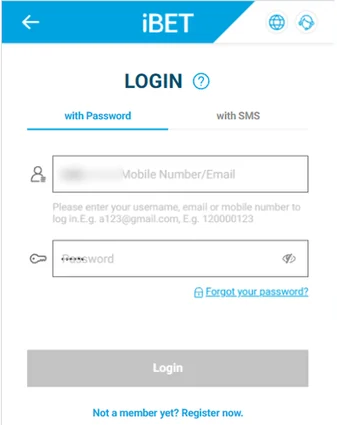
Step 1: Log in to iBET
Log in to your iBET account. Not a member yet? Register on the iBET site first, then come back. Your member identity is carried into iMALL automatically, so there is no second password to remember.
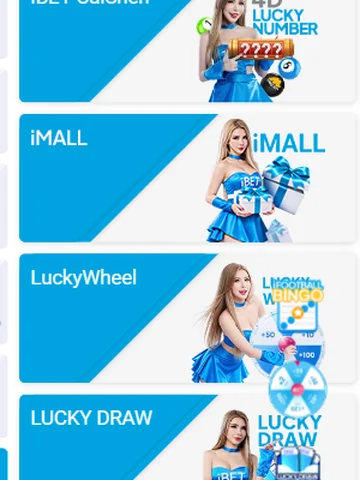
Step 2: Tap iMALL
On the iBET home screen, tap the iMALL tile. It sits with the other service tiles, and tapping it opens the mall in a session that is already tied to your account.
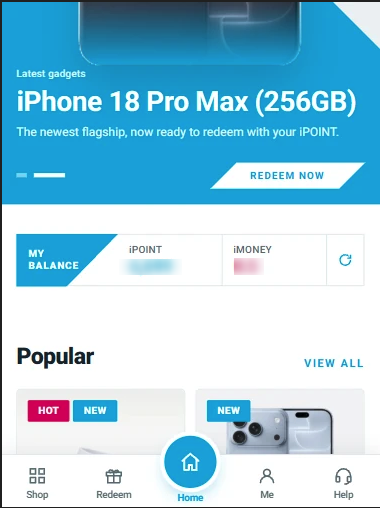
Step 3: Tap Me
You will land on iMALL. Tap Me to manage your account and check your iPOINTS and iMONEY balance. This is also where your Member no. is shown and where you add the delivery addresses you will need at checkout.
Doing this on a phone is the normal case, and the tile is easiest to reach from the app. If it is not installed yet, follow the iOS app download guide or the Android APK download guide first, or start from the mobile beginner guide — the mall behaves the same way in the app and on the mobile site.
How to redeem items on iMALL
A redemption takes under a minute once an address is saved. These are the five steps, and what to look at on each screen.
Step 1: Go to Shop
On iMALL, tap Shop in the menu or browse items on the home page. Use the category sheet to narrow things down, or the search box if you already know what you are after.
Step 2: Choose your item
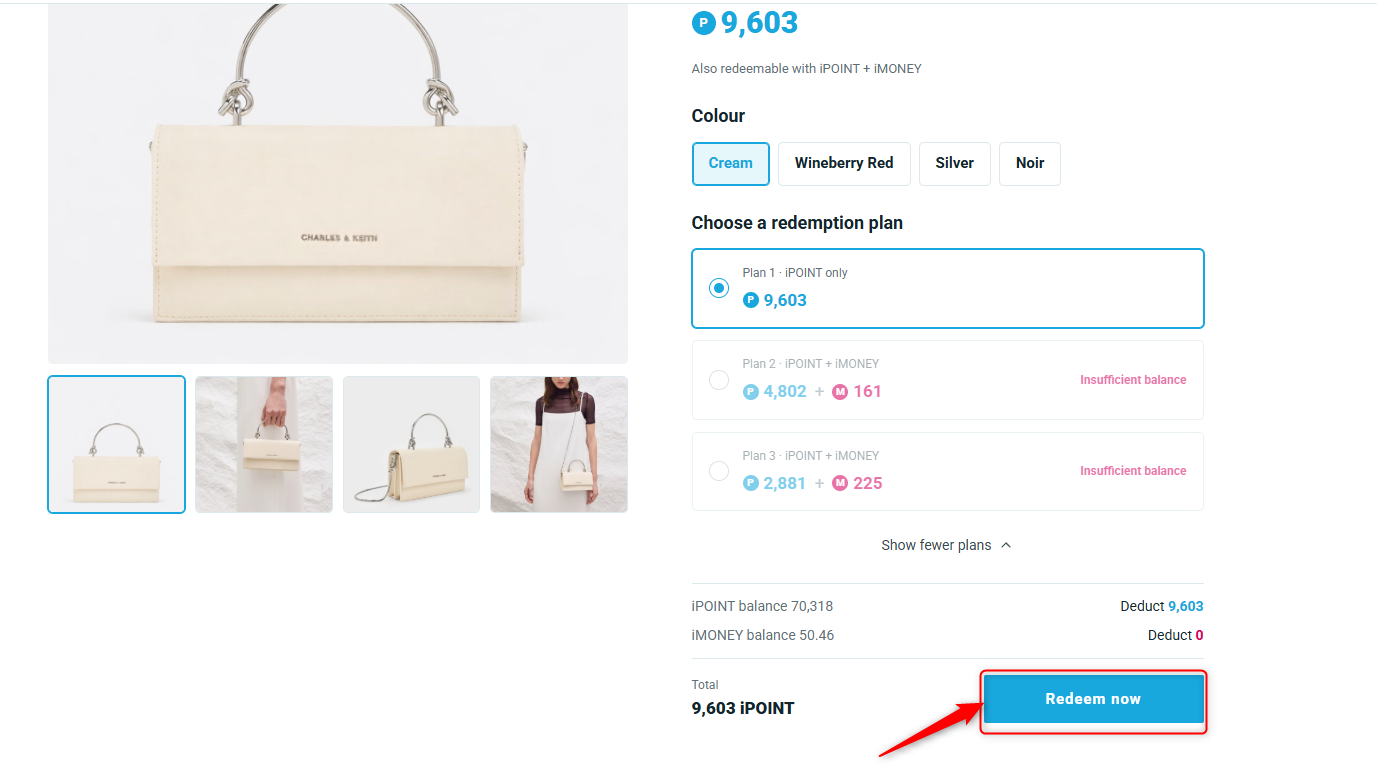
Pick the item you want. On its page, choose to pay with iPOINTS only, or iPOINTS plus iMONEY. Read About this product for the specification and Redemption details for the terms, and if the item has options such as size or colour, select one — the mall will stop you at checkout if you have not.
Step 3: Redeem now
Check your plan and options, then tap Redeem now. Nothing is deducted until you confirm on the next screen, and you can still back out.
Step 4: Confirm delivery
Choose or add a delivery address, then confirm your redemption. The address you used last time is pre-selected, and you can leave a note such as a preferred delivery time. Addresses are saved to your account up to a limit, so delete ones you no longer use.
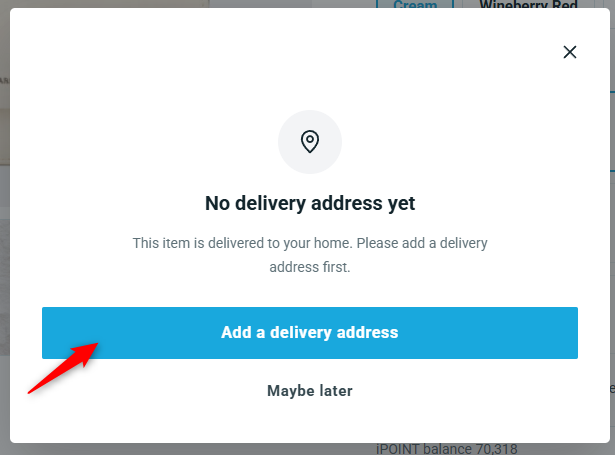
Step 5: All done
Your points are deducted right away. The confirmation screen shows the Redemption no., the item, what you paid, your remaining iPOINT balance, the delivery address and the time — worth a screenshot. Track delivery in Redemptions.
After you redeem: tracking your order
Every redemption lands in Redemptions, reachable from the menu or from the confirmation screen. Orders move through three states: Processing, Preparing and Shipped. While an order is processing the mall shows the expected timing — items are expected to ship in 3 to 5 working days — and once it moves to Preparing your item is being packed. When it ships you get the courier and the tracking number on the order itself.
If you need to find an old order, the Redemptions page filters by date range and searches by item name or redemption no. That is what the Redemption no. on your confirmation screen is for, so it is worth keeping.
Not every redemption completes, and the mall is explicit when one does not. A failed redemption tells you plainly that no iPOINT or iMONEY was deducted, and a cancelled order that has been refunded is marked Points refunded. If the points system is still catching up you will see a note that your points are being credited rather than a silent gap.
Interested?
Start playing on iBET and collect iPOINTS for your next reward on iMALL.
Refer a friend and get RM38: invite your friends to iBET and get RM38 when they join.
Need help? Chat or call the Customer Care team and they will get it sorted out.
Start Collecting iPOINTS on iBET Today! >>
Frequently asked questions
How do I earn iPOINTS?
Through valid bets. Each member level has a rate — RM200 of valid bets per iPOINT at Common, down to RM160 at Black Card — and promotions on the iBET website award iPOINTS as well, in amounts set by each campaign. Lottery play does not earn iPOINTS.
What is the difference between iPOINT and iMONEY?
iPOINTS are reward points earned from play. iMONEY is your iBET deposit balance. Items are redeemed with iPOINTS only, or with iPOINTS plus iMONEY where iMONEY covers the shortfall.
Can I pay for an item with iMONEY alone?
No. Every redemption plan includes iPOINTS; iMONEY exists to top up the difference when your points fall a little short.
Where do I check my balance and member number?
On the Me page inside iMALL. It shows your Member no., your balance and the delivery addresses saved to your account.
Do I need a delivery address before I redeem?
Yes. The mall asks you to choose one at checkout and will not let the redemption through without it. The address you used last time is pre-selected, and you can store several up to the account limit.
How long does delivery take?
Orders are expected to ship within 3 to 5 working days. Once the parcel is handed over you will see the courier and tracking number against the order in Redemptions.
How do I find an old redemption?
Open Redemptions and use the date filter, or search by item name or redemption no. The redemption number is on the confirmation screen you saw when the order went through.
My redemption failed. Have I lost the points?
No. A failed redemption states that no iPOINT or iMONEY was deducted. Common reasons are that the balance changed, the item sold out or was delisted, the plans were updated, or the system was briefly busy — try again, or contact support if it repeats.
Why does iMALL ask me to sign in again?
Because the mall must be launched from the member side so your identity is carried across. Opening the shop address directly, or using a link that has already been used or has expired, produces that message. Go back to iBET and tap the iMALL tile again.
Can I redeem while my account is suspended?
No. A suspended account cannot redeem, and the mall will say so. Contact Customer Care to sort the account out first.
iMALL Redemption Programme: How to Turn Your iPOINTS into Real Rewards
Welcome to iMALL, the official iBET gift mall. To thank members for their support we have opened a dedicated rewards area with thousands of items to choose from.
Whether it is luxury goods, fashion, electronics or games, redeem what you like with your iPOINTS and iMONEY and enjoy the member service iBET is known for.
This guide walks through the whole thing in order: what iPOINTS and iMONEY are, how many you earn at each member level, how to open iMALL from your iBET account, how a redemption actually works, and what happens after you tap Redeem now. If you have not installed the app yet, start with the iBET deposit guide and the beginner guide hub.
What are iPOINTS?
iPOINTS are iBET reward points. Reach the valid bet amount shown in the table below for your member level and you earn iPOINTS; collect enough of them and you can redeem items on iMALL.
You can also pick up iPOINTS through promotions on the iBET website, in amounts set by each campaign’s terms.
Two details are worth reading twice. The first is that iPOINTS are earned on valid bets, not on deposits and not on wins — the figure that matters is how much you actually put through the tables, and a settled bet is what counts. The second is the exclusion printed under the table: lottery play does not earn iPOINTS. Everything else across live casino, sports and slots does.
You never have to track this by hand. Your running total sits on the Me page inside iMALL under My balance, next to your Member no., and the same page lists the delivery addresses you have saved.
Promotions are the other way in, and they change every month — the campaign terms state how many iPOINTS each one awards. The current list is on the iBET promotions page, and if you are still deciding where to play, the live casino games beginner guide and online slots guide are the fastest way to get oriented.
What is iMONEY?
iMONEY comes from the deposits you make on iBET. Besides playing with it, you can pair it with iPOINTS to redeem rewards on iMALL.
A little short of iPOINTS for the item you want? Top up the difference with iMONEY.
In practice this is what stops a reward from being out of reach. Every item on iMALL carries one or more redemption plans, and a plan is either iPOINTS only or iPOINTS plus iMONEY. If an item needs more iPOINTS than you hold, the mixed plan lets your deposit balance cover the gap instead of making you wait another month.
The product page shows which plans are available; if there are several, open More plans to compare them before you commit. When your balance is not enough for any plan, the button reads Insufficient balance rather than Available, so you can see it at a glance.
Because iMONEY is simply your deposit balance, anything that affects deposits affects it — payment channels, processing times and the minimums are all covered in the iBET deposit guide. The withdrawal guide is worth a read at the same time, since the two share the same verification steps.
iPOINTS reward levels
Valid bet amount needed to earn 1 iPOINT
| Member level | Valid bet (RM) |
| Common | RM200 |
| Silver | RM190 |
| Gold | RM180 |
| Platinum | RM170 |
| Black Card | RM160 |
Example: As an iBET Common member, you earn 1 iPOINT for every RM200 in valid bets.
* Lottery not included.
Read the table as a price per point: the higher your member level, the less you have to stake for the same iPOINT. A Common member needs RM200 of valid bets per point; a Black Card member needs RM160, which is 20% less for exactly the same reward. Over a month of normal play that gap compounds into a meaningfully larger balance.
A worked example makes it concrete. Put RM20,000 of valid bets through in a month and a Common member collects 100 iPOINTS, a Gold member 111, and a Black Card member 125 — same play, three different rewards balances, purely because of tier.
Member level is the same ladder that governs your rebate and withdrawal limits, so moving up pays twice. The tiers, the rates and the qualification rules are set out on the iBET VIP page.
How to visit your iMALL account from iBET
iMALL only opens from inside your iBET session. If you paste the shop address straight into a browser you will be told to sign in again and to launch the service from the member app — that is by design, because the mall has to know whose iPOINTS it is spending. Always start from iBET.
Step 1: Log in to iBET
Log in to your iBET account. Not a member yet? Register on the iBET site first, then come back. Your member identity is carried into iMALL automatically, so there is no second password to remember.
Step 2: Tap iMALL
On the iBET home screen, tap the iMALL tile. It sits with the other service tiles, and tapping it opens the mall in a session that is already tied to your account.
Step 3: Tap Me
You will land on iMALL. Tap Me to manage your account and check your iPOINTS and iMONEY balance. This is also where your Member no. is shown and where you add the delivery addresses you will need at checkout.
Doing this on a phone is the normal case, and the tile is easiest to reach from the app. If it is not installed yet, follow the iOS app download guide or the Android APK download guide first, or start from the mobile beginner guide — the mall behaves the same way in the app and on the mobile site.
How to redeem items on iMALL
A redemption takes under a minute once an address is saved. These are the five steps, and what to look at on each screen.
Step 1: Go to Shop
On iMALL, tap Shop in the menu or browse items on the home page. Use the category sheet to narrow things down, or the search box if you already know what you are after.
Step 2: Choose your item
Pick the item you want. On its page, choose to pay with iPOINTS only, or iPOINTS plus iMONEY. Read About this product for the specification and Redemption details for the terms, and if the item has options such as size or colour, select one — the mall will stop you at checkout if you have not.
Step 3: Redeem now
Check your plan and options, then tap Redeem now. Nothing is deducted until you confirm on the next screen, and you can still back out.
Step 4: Confirm delivery
Choose or add a delivery address, then confirm your redemption. The address you used last time is pre-selected, and you can leave a note such as a preferred delivery time. Addresses are saved to your account up to a limit, so delete ones you no longer use.
Step 5: All done
Your points are deducted right away. The confirmation screen shows the Redemption no., the item, what you paid, your remaining iPOINT balance, the delivery address and the time — worth a screenshot. Track delivery in Redemptions.
After you redeem: tracking your order
Every redemption lands in Redemptions, reachable from the menu or from the confirmation screen. Orders move through three states: Processing, Preparing and Shipped. While an order is processing the mall shows the expected timing — items are expected to ship in 3 to 5 working days — and once it moves to Preparing your item is being packed. When it ships you get the courier and the tracking number on the order itself.
If you need to find an old order, the Redemptions page filters by date range and searches by item name or redemption no. That is what the Redemption no. on your confirmation screen is for, so it is worth keeping.
Not every redemption completes, and the mall is explicit when one does not. A failed redemption tells you plainly that no iPOINT or iMONEY was deducted, and a cancelled order that has been refunded is marked Points refunded. If the points system is still catching up you will see a note that your points are being credited rather than a silent gap.
Interested?
Start playing on iBET and collect iPOINTS for your next reward on iMALL.
Refer a friend and get RM38: invite your friends to iBET and get RM38 when they join.
Need help? Chat or call the Customer Care team and they will get it sorted out.
Start Collecting iPOINTS on iBET Today! >>
Frequently asked questions
How do I earn iPOINTS?
Through valid bets. Each member level has a rate — RM200 of valid bets per iPOINT at Common, down to RM160 at Black Card — and promotions on the iBET website award iPOINTS as well, in amounts set by each campaign. Lottery play does not earn iPOINTS.
What is the difference between iPOINT and iMONEY?
iPOINTS are reward points earned from play. iMONEY is your iBET deposit balance. Items are redeemed with iPOINTS only, or with iPOINTS plus iMONEY where iMONEY covers the shortfall.
Can I pay for an item with iMONEY alone?
No. Every redemption plan includes iPOINTS; iMONEY exists to top up the difference when your points fall a little short.
Where do I check my balance and member number?
On the Me page inside iMALL. It shows your Member no., your balance and the delivery addresses saved to your account.
Do I need a delivery address before I redeem?
Yes. The mall asks you to choose one at checkout and will not let the redemption through without it. The address you used last time is pre-selected, and you can store several up to the account limit.
How long does delivery take?
Orders are expected to ship within 3 to 5 working days. Once the parcel is handed over you will see the courier and tracking number against the order in Redemptions.
How do I find an old redemption?
Open Redemptions and use the date filter, or search by item name or redemption no. The redemption number is on the confirmation screen you saw when the order went through.
My redemption failed. Have I lost the points?
No. A failed redemption states that no iPOINT or iMONEY was deducted. Common reasons are that the balance changed, the item sold out or was delisted, the plans were updated, or the system was briefly busy — try again, or contact support if it repeats.
Why does iMALL ask me to sign in again?
Because the mall must be launched from the member side so your identity is carried across. Opening the shop address directly, or using a link that has already been used or has expired, produces that message. Go back to iBET and tap the iMALL tile again.
Can I redeem while my account is suspended?
No. A suspended account cannot redeem, and the mall will say so. Contact Customer Care to sort the account out first.